Prepare your Cyber Resilience Act evidence
Fendkit is a free command-line tool that runs on your computer. It checks the third-party components in your software release for known vulnerabilities and writes draft CRA documents for you to review.
WordPress plugins & themes Composer npm
Set it up with your coding agent
Use Claude Code, Codex or another coding agent in your product folder.
View the prompt
Get this project ready for the EU Cyber Resilience Act with Fendkit. Use https://github.com/vincentsch/fendkit: read its AGENTS.md and follow the steps. Ask me the questions only I can answer, and show me what is still missing at the end.
Status report
See what still needs doing
The status report puts next actions first. Updates appear above the checklist, followed by decisions and drafts that need your review.
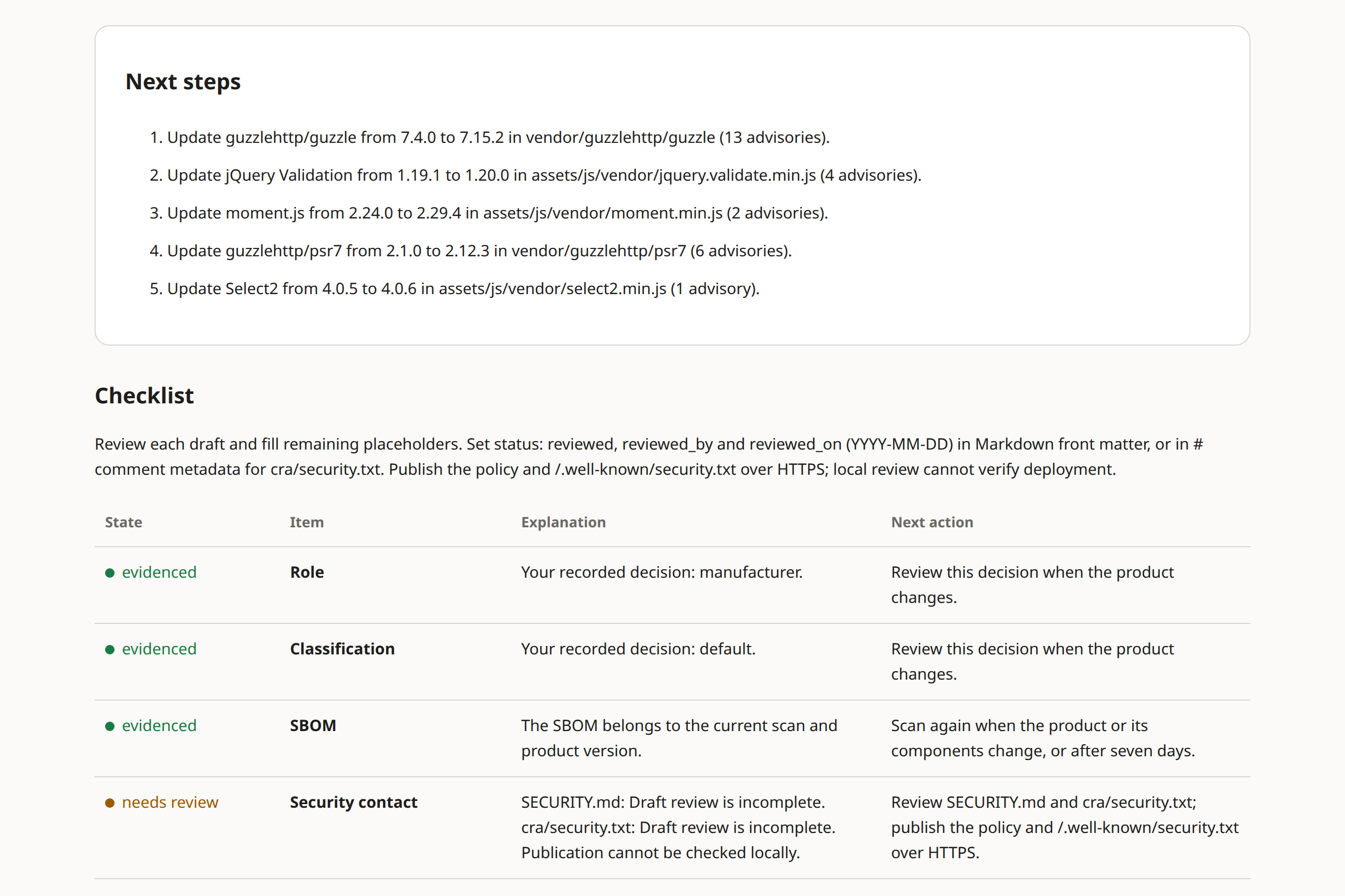
This check exited 0, which means no configured failure. Evidence states and exit codes
Component inventory
Which components are in your release?
Point Fendkit at your release ZIP or folder. It uses package files and recognised library banners to identify shipped components, then checks known advisories from OSV.dev and CISA’s catalog of known exploited vulnerabilities.
- A software bill of materials (SBOM) records the components it finds.
- Unknown versions stay unknown. Stripped or renamed bundles may go unrecognised.
- pnpm and Yarn lockfiles are detected but not parsed.
Found
  WordPress plugin   Acme Booking 2.3.1 (acme-booking.php, readme.txt)
  Composer           4 packages to ship, 1 for development only (not shipped)
  npm                2 build tools (not shipped)
  Bundled JS         3 libraries in assets/js/vendor/ not listed anywhere:
                     jQuery Validation 1.19.1, moment.js 2.24.0, Select2 4.0.5
  Release file       ../dist/acme-booking-2.3.1.zip
  Note               Development packages compiled into bundles need a manual shipped correction or a move to dependencies
Evidence drafts
Documents you complete and review
cra.yml keeps your product facts and decisions. Fendkit
uses those answers to prepare the applicable drafts.
Changed answers do not rewrite existing documents. The declaration stays unsigned until the responsible person completes the legal process.
- Security contact
- Machine-readable contact
- Disclosure policy
- Support period
- User information
- Risk assessment
- Technical documentation
- EU declaration of conformity
- Incident checklist
The files depend on the role saved in cra.yml.
Incident reporting
Keep track of reporting deadlines
Tell Fendkit when you became aware of an incident. It calculates deadlines and prepares drafts. You review and submit the reports through ENISA’s Single Reporting Platform.
An advisory alone does not establish a reportable event. Your role and product determine which duties apply.
Manufacturer reporting
Article 14 reporting obligations already apply.
Main CRA obligations
Most other obligations apply from this date.
Dates from Article 71. Role and scope explained.
GitHub Actions
Check each release in GitHub Actions
Scan the release you build on each pull request. The Action checks the saved evidence and keeps the reports.
The check fails on unresolved findings in CISA’s known exploited catalog when the component ships or may ship. Overdue incident reporting stages also fail it.
Pull-request job example GitHub Actions · YAML
Run fendkit init locally and commit
cra.yml
first. The example job goes under jobs:; replace
make release with your build command.
  check:
    if: github.event_name == 'pull_request'
    runs-on: ubuntu-latest
    steps:
      - uses: actions/checkout@3d3c42e5aac5ba805825da76410c181273ba90b1 # v7.0.1
      # Run fendkit init locally and commit cra.yml before enabling this job.
      # Replace this build command with your product's release build.
      - name: Build product ZIP
        run: make release
      - uses: vincentsch/[email protected]
        with:
          version: v0.1.0
          release: dist/*.zip
Before you start
What Fendkit doesn’t do
You decide your legal role and product class. Fendkit records those decisions and gives no legal advice.
- It does not scan your own code for vulnerabilities.
- Zero findings cannot prove there are no vulnerabilities. Failed lookups leave the scan incomplete.
- It never signs or issues a final declaration of conformity.
- It does not prepare the additional assessment procedures for important or critical product classes, or assess open-source steward duties under Article 24.
Common questions
More answers in the documentation.
Is my free plugin covered by the CRA?
A free licence alone does not decide this. Commercial activity matters, including paid editions or paid support. Free and open-source software supplied outside a commercial activity is excluded; donations and hosted services need a scope review. Your legal position depends on your circumstances.
Role and scope in the docs and the Commission’s open-source guidance explain the factors.
What is sent over the network?
Online scans send package names and exact versions to OSV.dev for advisory lookups. They also download CISA’s Known Exploited Vulnerabilities catalog. Those names can reveal private dependencies. Fendkit does not upload your source code or maker answers.
scan, demo and init skip
those lookups with --offline and leave evidence
incomplete. Demo and init do online lookups by default.
Installation downloads from GitHub; Go installation uses its
configured module services. Doctor sends an empty OSV request
and checks KEV headers. Your coding agent has its own network
settings.
Can I use it for a WordPress theme?
Yes. Fendkit reads theme style headers and readme.txt. It also checks supported Composer and npm package files, plus recognised bundled libraries. That detection does not decide your theme’s legal scope.
What is the licence?
Fendkit is free and open source under the MIT licence.
Example plugin
Try it before your own release
The demo runs on a bundled fictional plugin. It creates a release ZIP and draft documents.
fendkit demo